子比标签云模块方形美化代码

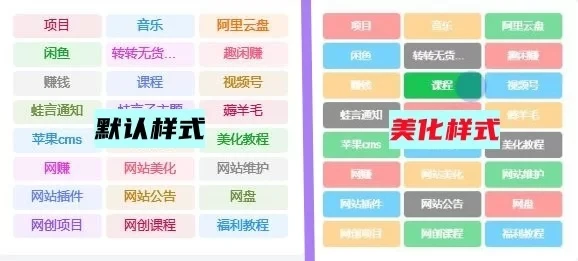
效果图:

子比标签云模块方形美化代码插图

这是一款子比标签云小工具美化代码,可以看到美化后未选中的时候标签块是很灰的,选中之后颜色就变深了!

部署教程:

第一步:

添加Zibll标签云小工具,设置参数,选择固定宽度,标签数量为3的倍数
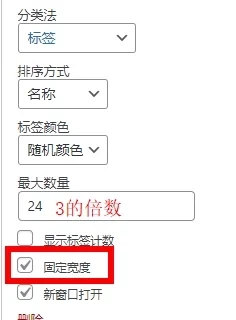
子比标签云模块方形美化代码插图1

第二步:

将下面的代码放到:子比主题–>>自定义CSS样式
本文隐藏内容
/*文章随机彩色标签 蛙言网 b66b.cn*/
.widget-tag-cloud.fixed-width .but:hover{opacity: 1;}.widget-tag-cloud.fixed-width .but{opacity: 0.6;line-height: 20px !important;padding: 4px 10px !important;font-size: 12px !important;}.widget-tag-cloud.fixed-width .but:nth-child(5n){background-color: #4A4A4A;color: #FFF}.widget-tag-cloud.fixed-width .but:nth-child(5n+1){background-color: #ff5e5c;color: #FFF}.widget-tag-cloud.fixed-width .but:nth-child(5n+2){background-color: #ffbb50;color: #FFF}.widget-tag-cloud.fixed-width .but:nth-child(5n+3){background-color: #1ac756;color: #FFF}.widget-tag-cloud.fixed-width .but:nth-child(5n+4){background-color: #19B5FE;color: #FFF}
/*文章随机彩色标签 蛙言网 b66b.cn*/
© 版权声明
THE END
喜欢就支持一下吧
点赞15 分享
评论 抢沙发

请登录后发表评论

    暂无评论内容