

一直想弄个相似Markdown效果的前端编辑器功能,搜索下还真有发现
原帖在这:
熟悉的猪头汉堡,跟着在扣扣上调侃几句,久别回归啦。
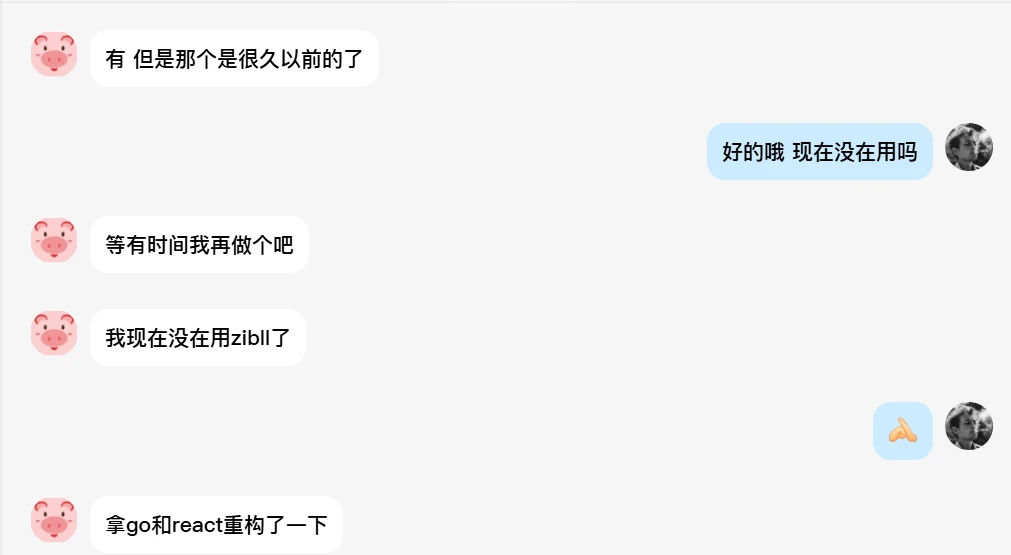
找到方法直接用AI搓一个
实现效果
- Markdown粘贴,自动转HTML
- 自动加载代码、表格、自动对齐等
- 适配现在8.6版本
使用办法
在wp-content/themes/zibll/js/editextend.min.js添加
editextend.min.js
本文隐藏内容
/*
* 子比主题前台编辑器扩展 – 增强 Markdown 支持与粘贴优化 V9
* 包含:Markdown 表格支持 (GFM)、特殊代码块识别、TinyMCE 深度集成
* V9 更新:彻底修复重复粘贴问题 (使用 PastePreProcess 机制)
*/
(function($) {
‘use strict’;
// 防止重复初始化
if (window.zibllMarkdownExtensionInited) return;
window.zibllMarkdownExtensionInited = true;
// 占位符存储
var codeBlocks = [];
/**
* 保护代码块:将 <pre>…</pre> 替换为占位符
*/
function protectCodeBlocks(html) {
codeBlocks = [];
return html.replace(/<pre[\s\S]*?<\/pre>/gi, function(match) {
codeBlocks.push(match);
return ‘___CODE_BLOCK_’ + (codeBlocks.length – 1) + ‘___’;
});
}
/**
* 恢复代码块:将占位符还原为原始内容
*/
function restoreCodeBlocks(html) {
return html.replace(/___CODE_BLOCK_(\d+)___/g, function(match, id) {
return codeBlocks[parseInt(id)] || match;
});
}
/**
* 解析表格行
*/
function splitTableLine(line) {
var parts = line.split(‘|’);
if (line.trim().startsWith(‘|’) && parts.length > 0) parts.shift();
if (line.trim().endsWith(‘|’) && parts.length > 0) parts.pop();
return parts;
}
/**
* 解析对齐方式
*/
function parseAligns(separatorLine) {
var parts = splitTableLine(separatorLine);
return parts.map(function(part) {
var p = part.trim();
if (p.startsWith(‘:’) && p.endsWith(‘:’)) return ‘center’;
if (p.endsWith(‘:’)) return ‘right’;
if (p.startsWith(‘:’)) return ‘left’;
return ”;
});
}
/**
* 处理 Markdown 表格
*/
function processTables(text) {
var lines = text.split(‘\n‘);
var result = [];
var inTable = false;
var tableBuffer = [];
for (var i = 0; i < lines.length; i++) {
var line = lines[i].trimEnd();
var trimLine = line.trim();
if (inTable) {
if (trimLine.indexOf(‘|’) !== -1) {
tableBuffer.push(trimLine);
} else {
result.push(convertTableToHtml(tableBuffer));
tableBuffer = [];
inTable = false;
result.push(line);
}
} else {
var nextLine = (i + 1 < lines.length) ? lines[i+1].trim() : ”;
var isSeparator = /^\|?[\s\-:|]+\|?$/.test(nextLine) && nextLine.indexOf(‘-‘) !== -1;
if (trimLine.indexOf(‘|’) !== -1 && isSeparator) {
inTable = true;
tableBuffer.push(trimLine);
tableBuffer.push(nextLine);
i++;
} else {
result.push(line);
}
}
}
if (inTable) {
result.push(convertTableToHtml(tableBuffer));
}
return result.join(‘\n‘);
}
/**
* 将表格缓冲转换为 HTML
*/
function convertTableToHtml(buffer) {
if (buffer.length < 2) return buffer.join(‘\n‘);
var aligns = parseAligns(buffer[1]);
var headers = splitTableLine(buffer[0]);
var html = ‘<table class=”table table-bordered table-striped” style=”border-collapse: collapse; width: 100%; margin-bottom: 1rem; border: 1px solid #dee2e6;”>’;
html += ‘<thead><tr>’;
headers.forEach(function(cell, index) {
var align = aligns[index] ? ‘ style=”text-align:’ + aligns[index] + ‘; border: 1px solid #dee2e6; padding: 0.75rem;”‘ : ‘ style=”border: 1px solid #dee2e6; padding: 0.75rem;”‘;
html += ‘<th’ + align + ‘>’ + cell.trim() + ‘</th>’;
});
html += ‘</tr></thead>’;
html += ‘<tbody>’;
for (var i = 2; i < buffer.length; i++) {
html += ‘<tr>’;
var cells = splitTableLine(buffer[i]);
while (cells.length < headers.length) cells.push(”);
cells.forEach(function(cell, index) {
if (index < headers.length) {
var align = aligns[index] ? ‘ style=”text-align:’ + aligns[index] + ‘; border: 1px solid #dee2e6; padding: 0.75rem;”‘ : ‘ style=”border: 1px solid #dee2e6; padding: 0.75rem;”‘;
html += ‘<td’ + align + ‘>’ + cell.trim() + ‘</td>’;
}
});
html += ‘</tr>’;
}
html += ‘</tbody></table>’;
return html;
}
/**
* 将 Markdown 文本转换为 HTML
*/
function markdownToHtml(markdown) {
if (!markdown) return ”;
var html = markdown;
// 1. 特殊格式代码块识别
html = html.replace(/[“”]\s*(ini|text|code|js|php|html|css|bash|sql|python|java|go|cpp|c|json|xml|yaml)\s*[:]?\s+([\s\S]*?)[””]/gim, function(match, lang, content) {
return ‘<pre><code class=”language-‘ + lang.toLowerCase() + ‘”>’ + content.trim() + ‘</code></pre>’;
});
// 2. 标准代码块转换
html = html.replace(/“`(\w+)?\s*([\s\S]*?)“`/g, function(match, lang, code) {
return ‘<pre><code class=”language-‘ + (lang || ‘text’) + ‘”>’ + code.trim() + ‘</code></pre>’;
});
// 3. 保护代码块
html = protectCodeBlocks(html);
// 4. 表格处理
html = processTables(html);
// 5. 其他 Markdown 元素转换
html = html.replace(/`([^`]+)`/g, ‘<code>$1</code>’);
html = html.replace(/!\[([^\]]*)\]\(([^)]+)\)/g, ‘<img src=”$2″ alt=”$1″>’);
html = html.replace(/\[([^\]]+)\]\(([^)]+)\)/g, ‘<a href=”$2″ target=”_blank”>$1</a>’);
html = html.replace(/\*\*([^*]+)\*\*/g, ‘<strong>$1</strong>’);
html = html.replace(/\*([^*]+)\*/g, ‘<em>$1</em>’);
html = html.replace(/^> (.*$)/gim, ‘<blockquote>$1</blockquote>’);
html = html.replace(/^#{1,6}\s+(.*$)/gim, function(match, content) {
var level = match.trim().split(‘ ‘)[0].length;
return ‘<h’ + level + ‘>’ + content + ‘</h’ + level + ‘>’;
});
html = html.replace(/^\s*[-*]\s+(.*$)/gim, ‘<li>$1</li>’);
html = html.replace(/^\s*\d+\.\s+(.*$)/gim, ‘<li>$1</li>’);
html = html.replace(/(<li>.*<\/li>)/gim, ‘<ul>$1</ul>’);
html = html.replace(/<\/ul>\s*<ul>/g, ”);
html = html.replace(/^—$/gim, ‘<hr>’);
html = html.replace(/\n\n/g, ‘<br><br>’);
html = html.replace(/(<\/(h[1-6]|ul|ol|pre|blockquote|table|thead|tbody|tr|th|td)>)\s*(<br>\s*)+/gi, ‘$1’);
html = html.replace(/<hr>\s*(<br>\s*)+/gi, ‘<hr>’);
// 6. 恢复代码块
html = restoreCodeBlocks(html);
return html;
}
/**
* 清理 HTML
*/
function cleanHtml(html) {
html = html.replace(/ class=”[^”]*”/g, ”);
html = html.replace(/ style=”[^”]*”/g, ”);
html = html.replace(/<style([\s\S]*?)<\/style>/gi, ”);
html = html.replace(/<script([\s\S]*?)<\/script>/gi, ”);
html = html.replace(/<span>(.*?)<\/span>/g, ‘$1’);
return html;
}
/**
* 检测文本是否包含 Markdown 特征
*/
function detectMarkdown(text) {
if (!text) return false;
return /^\|?.*\|.*\|$/m.test(text) ||
/^#{1,6}\s|^>\s|^“`|^\*\s|^-\s|^\d+\.\s|\[.*\]\(.*\)|[“”]\s*(ini|text|code)\s+/m.test(text);
}
/**
* TinyMCE 粘贴事件 (仅设置标志,不插入)
*/
function handleTinyMCEPaste(editor, e) {
var originalEvent = e.originalEvent || e;
var clipboardData = originalEvent.clipboardData || window.clipboardData;
if (!clipboardData) return;
var pastedText = clipboardData.getData(‘text/plain’);
if (detectMarkdown(pastedText)) {
var htmlContent = markdownToHtml(pastedText);
if (htmlContent) {
// 存储转换后的内容,供 PastePreProcess 使用
editor._zibMarkdownContent = htmlContent;
editor._zibIsMarkdownPaste = true;
console.log(‘Markdown detected in TinyMCE paste’);
// 注意:这里不阻止默认行为,让 TinyMCE 继续处理,直到触发 PastePreProcess
}
}
}
/**
* TinyMCE 粘贴预处理 (替换内容)
*/
function handleTinyMCEPreProcess(editor, e) {
if (editor._zibIsMarkdownPaste && editor._zibMarkdownContent) {
// 替换 TinyMCE 准备插入的内容
e.content = editor._zibMarkdownContent;
// 重置标志
editor._zibIsMarkdownPaste = false;
editor._zibMarkdownContent = null;
console.log(‘Markdown content injected via PastePreProcess’);
}
}
/**
* 全局粘贴处理 (针对非 TinyMCE 输入框)
*/
function handleGlobalPaste(e) {
// 如果目标在 TinyMCE 编辑器内,则忽略 (由 TinyMCE 处理)
if ($(e.target).closest(‘.mce-content-body’).length > 0 || $(e.target).hasClass(‘mce-content-body’)) {
return;
}
var originalEvent = e.originalEvent || e;
var clipboardData = originalEvent.clipboardData || window.clipboardData;
if (!clipboardData) return;
var pastedText = clipboardData.getData(‘text/plain’);
if (detectMarkdown(pastedText)) {
var htmlContent = markdownToHtml(pastedText);
if (htmlContent) {
e.preventDefault();
insertHtmlAtCursor(htmlContent);
}
}
}
/**
* 在光标处插入 HTML
*/
function insertHtmlAtCursor(html) {
var sel, range;
if (window.getSelection) {
sel = window.getSelection();
if (sel.getRangeAt && sel.rangeCount) {
range = sel.getRangeAt(0);
range.deleteContents();
var el = document.createElement(“div”);
el.innerHTML = html;
var frag = document.createDocumentFragment(), node, lastNode;
while ((node = el.firstChild)) {
lastNode = frag.appendChild(node);
}
range.insertNode(frag);
if (lastNode) {
range = range.cloneRange();
range.setStartAfter(lastNode);
range.collapse(true);
sel.removeAllRanges();
sel.addRange(range);
}
}
} else if (document.selection && document.selection.type != “Control”) {
document.selection.createRange().pasteHTML(html);
}
}
function registerImageStub() {
try {
if (typeof tinymce !== ‘undefined’ && tinymce.PluginManager) {
if (!(tinymce.PluginManager.lookup && tinymce.PluginManager.lookup.image)) {
tinymce.PluginManager.add(‘image’, function(editor) { return {}; });
}
}
} catch (_) {}
}
function clearTinyNotifications(editor) {
try {
var c = editor && editor.getContainer && editor.getContainer();
if (!c) return;
var ns = c.querySelectorAll(‘.mce-notification’);
for (var i = 0; i < ns.length; i++) {
if (ns[i] && ns[i].parentNode) ns[i].parentNode.removeChild(ns[i]);
}
} catch (_) {}
}
function hideImageButton(editor) {
try {
var c = editor && editor.getContainer && editor.getContainer();
if (!c) return;
var btns = c.querySelectorAll(‘.mce-toolbar .mce-btn[aria-label=”插入/编辑图片”], .mce-toolbar .mce-i-image’);
for (var i = 0; i < btns.length; i++) {
btns[i].style.display = ‘none’;
}
} catch (_) {}
}
// 初始化
$(document).ready(function() {
var editorSelector = ‘.zib-widget-editor, .wp-editor-area, #post_content, [contenteditable=”true”]’;
// 绑定全局粘贴 (非 TinyMCE)
$(document).on(‘paste’, editorSelector, handleGlobalPaste);
// TinyMCE 初始化逻辑
var setupTinyMCE = function() {
if (typeof tinymce !== ‘undefined’ && tinymce.editors) {
registerImageStub();
// 确保 AddEditor 监听器只添加一次
if (!window.zibllTinyMCEHooked) {
window.zibllTinyMCEHooked = true;
tinymce.on(‘AddEditor’, function(e) {
setupEditor(e.editor);
});
}
// 处理已存在的编辑器
tinymce.each(tinymce.editors, function(editor) {
setupEditor(editor);
});
}
};
function setupEditor(editor) {
// 防止重复设置
if (editor._zibllMarkdownSetup) return;
editor._zibllMarkdownSetup = true;
// 绑定事件
if (editor.on) {
// 先解绑以防万一
editor.off(‘paste’, handleTinyMCEPaste); // 注意:匿名函数无法解绑,这里只是示例
editor.on(‘paste’, function(e) {
handleTinyMCEPaste(editor, e);
});
editor.on(‘PastePreProcess’, function(e) {
handleTinyMCEPreProcess(editor, e);
});
// UI 清理
editor.on(‘init’, function() {
clearTinyNotifications(editor);
hideImageButton(editor);
});
// 立即执行一次 UI 清理
clearTinyNotifications(editor);
hideImageButton(editor);
}
}
setupTinyMCE();
setTimeout(setupTinyMCE, 1000);
setTimeout(setupTinyMCE, 3000);
console.log(‘Zibll Editor Extension Loaded: Markdown Support V9 (Anti-Duplicate & Table Support)’);
});
})(jQuery);
© 版权声明
文章版权归作者所有,未经允许请勿转载。
THE END




















暂无评论内容